BigCommerce is known as one of the most trusted eCommerce platforms, offering a wide range of built-in tools that many rivals cannot match. To get the most out of these capabilities, store owners need to fully understand how the BigCommerce API works.
This guide from GritGlobal is created to help you do exactly that. We will walk through the essentials of the platform’s API, explain its key functions, and show you how it can unlock more value for your online store.
Highlights
- Learn how the BigCommerce API works and why it’s essential for managing store data, customers, orders, and storefront customization.
- Explore the main API types, including REST, GraphQL, Checkout, Payments, and Shipping, to understand what each can do for your store.
- Discover how to set up and manage API credentials, webhooks, and other advanced features to run your store more efficiently.
What is BigCommerce API?
An API, short for Application Programming Interface, works like a bridge that lets two different software systems exchange information and perform tasks together. Simply put, it enables separate applications to communicate and function as one.
The BigCommerce API is built to let merchants automate workflows and create custom connections within their BigCommerce store. With it, you can handle almost every aspect of store operations, from products and orders to customers, carts, and checkouts. This means businesses gain more control and flexibility to tailor their online stores to unique needs.
Beyond that, these APIs also manage store data, customer login processes, and client-side queries for product information. It comes with a large set of endpoints, webhooks, and built-in functions designed to help merchants scale and operate more effectively.
Analysts estimate that the API economy could reach approximately $ 14.2 trillion in value by 2027, underscoring the importance of getting your API strategy right.
Common Types Of BigCommerce API Calls
The BigCommerce API provides different sets of tools designed to manage store data, handle customer authentication, and process client-side queries for product details. For merchants, knowing these types is important whether you want to build custom solutions on your own or work with a developer.
Below, we’ve highlighted the main categories of the platform’s API calls that store owners should understand.
REST APIs For Store Management
REST APIs in BigCommerce are built to automate transactions and update store data programmatically. With these APIs, you can add or edit products, adjust stock levels, create promotional coupons, or manage customer account details. They give you the ability to run your store more smoothly and with less manual effort.
GraphQL Storefront API
While REST APIs handle the backend side of store operations like products or orders, the GraphQL Storefront API focuses on shaping the front-end shopping experience. It serves as a flexible interface for working with storefront data, giving developers the ability to build headless stores or customize Stencil themes more effectively.
In the United States, 86% of CPG dollar sales now come from omnichannel shoppers, which raises the stakes for unified, API powered storefronts.
Through the GraphQL Storefront API, developers can pull detailed product catalog information, including advanced options for search, filtering, and sorting. It also supports retrieving product images in different resolutions and accessing customer information such as names, emails, and attributes.
Because it uses GraphQL, this API makes it possible to gather data from multiple resources in one request, ensuring faster and more efficient responses.
Checkout API
The BigCommerce API for checkout lets developers expand and adjust the built-in checkout system. While the default checkout is strong on its own, this API allows you to customize it to fit unique needs or merge it with a fully custom storefront.
Forbes notes that the average online shopping cart abandonment rate sits around 70% across dozens of studies, so reducing friction at this step can materially lift conversions.
With the Checkout API, you can create personalized checkout flows that cover everything from customer login to shipping calculations and payment handling. It’s especially useful for building flexible solutions across headless stores, mobile apps, or other specialized use cases.
Customer Login API
For businesses aiming to provide secure sign-in and single sign-on (SSO) options, the Customer Login API is the go-to tool. It gives shoppers the ability to log in with credentials from trusted identity providers or their existing accounts.
This API also supports alternative authentication flows. You can set up login methods like phone-based verification, helping customers who prefer simpler access without managing multiple passwords.
Current Customer API
The Current Customer API is designed to tell signed-in customers apart from guest visitors. It lets you identify which user is active on the storefront during their session. By confirming a customer’s identity in the browser, you can validate them and serve personalized details or data pulled from an external app.
Payments API
The Payments API in BigCommerce makes it possible to process transactions through integrated payment gateways. Shoppers choose their preferred method and finish checkout. Once the payment is approved, the order is generated through the Order API or Store Management Checkouts API. From there, funds are directed to the connected account, often through providers like PayPal.
Bloomberg reported that U.S. online holiday sales reached a record 222.1 billion dollars in 2023, with greater use of buy now, pay later playing a role. So supporting flexible payment options can influence completion rates.
Catalog API
The Catalog API gives you full control over your store’s products, categories, brands, and bulk pricing rules. It supports CRUD actions (Create, Read, Update, Delete) across catalog data, making it easier to manage product information. With this API, you can update existing items, introduce new variants when launching or upgrading products, and improve how they appear on the storefront.
Shipping API
The Shipping API allows you to generate shipments directly from orders, including splitting one order into multiple packages if needed. Using BigCommerce’s V2 Shipping API, you can define shipping zones, methods, and carrier links. Once a shipment is created, you can assign the carrier, add tracking details, and link the shipping address ID, ensuring customers stay informed with transparent delivery updates.
What BigCommerce API Can Do For Your Store
After looking at the main categories of API calls, it’s time to see what the BigCommerce API can actually accomplish. These core functions give you the foundation to design flexible and tailored eCommerce experiences.
According to McKinsey’s 2024 B2B Pulse, 71% of B2B companies now offer ecommerce, and online channels already drive 34% of revenue. This shows how central digital buying has become.
Cart, Checkout, And Order Control
A fast and reliable checkout process is essential for every online store. With the BigCommerce API, you have complete control over carts, checkouts, and orders.
Using the REST Management API and REST Storefront API, you can create and update carts or manage the full checkout flow. The GraphQL Storefront API also supports mutations for these tasks. Together, these tools make the buying journey smooth from the moment a cart is started to the order being fulfilled.
For merchants who don’t want to manually build API workflows, GritGlobal’s, Bigcommerce Automation app, Atom8 provides a no-code automation layer. It connects with the system APIs to update order statuses, trigger customer notifications, or tag risky transactions automatically
Full Catalog Management
The Catalog API is built to let you create and manage products, categories, brands, and pricing rules across your store. You can perform CRUD actions to update product details, add variations, or adjust bulk pricing with ease.
Both the REST Management API and GraphQL Storefront API can be used here. BigCommerce also provides detailed documentation on handling catalog data, covering everything from products to categories and brands.
Customer Data Handling
One of the important uses of the BigCommerce API is managing customer information. You can create and update customer profiles, organize them into groups, and access login details. This functionality is key for running personalized marketing campaigns and improving customer relationship management.
Theme And UI Customization
The API also provides the flexibility to design storefronts that reflect your brand identity. With access to theme files and templates, you can customize typography, colors, and layouts so the entire site follows a consistent style.
On top of that, you can extend storefront features by adding custom scripts. Whether it’s integrating advanced analytics dashboards or embedding live chat tools for real-time support, these options help deliver a shopping experience tailored to your customers.
Real-Time Event Tracking With Webhooks
With the BigCommerce API, you can register and manage webhooks to stay updated on store events. These cover actions like new order creation, product updates, or changes made by customers. Webhooks are vital for automating workflows and connecting your store with third-party tools, ensuring everything runs smoothly in real time.
Webhooks are especially powerful when combined with automation apps for BigCommerce like Atom8 by GritGlobal. The app listens to system APIs webhooks in real time, then triggers actions such as sending Slack alerts, updating Google Sheets, or launching follow-up emails.
Where To Find And Set Up Your BigCommerce API Credentials?
As mentioned earlier, getting your BigCommerce API credentials is a must if you plan to migrate data or build integrations on this platform. To begin, you’ll need to create an API account that fits your business setup.
Inside the control panel, there are two main types of the platform’s API accounts:
- Store-level API accounts: Tied to a single store.
- Account-level API accounts: Work across every store connected to your BigCommerce account.
The process for creating each account type differs, so it’s important to follow the correct steps. Always review the API details to know which option is the right fit before proceeding.
A few conditions apply when setting up API accounts:
- Account-level access is only available to store owners.
- Store-level accounts can only be created by users with high-level permissions.
- To view webhooks, the store owner must give your account permission to read them.
Store-Level API Setup
Store-level BigCommerce API accounts come with a fixed access token that does not change. These accounts usually include the following elements:
- client_id: Identifies the app, user, or client making the request.
- client_secret: A securely encrypted value shared only between you and BigCommerce.
- access_token: Used for most REST API calls.
- client name: A label for easier management, not tied to the requests.
- API path: The URL where requests are sent. While it stays the same, it may include either /v2/ or /v3/ depending on the endpoint version.
Security tip: Never send your client_secret or access_token as plain text or inside an unencrypted payload. If exposed, attackers could use them to access store data.
With these basics understood, the next step is to create a store-level account for your store.
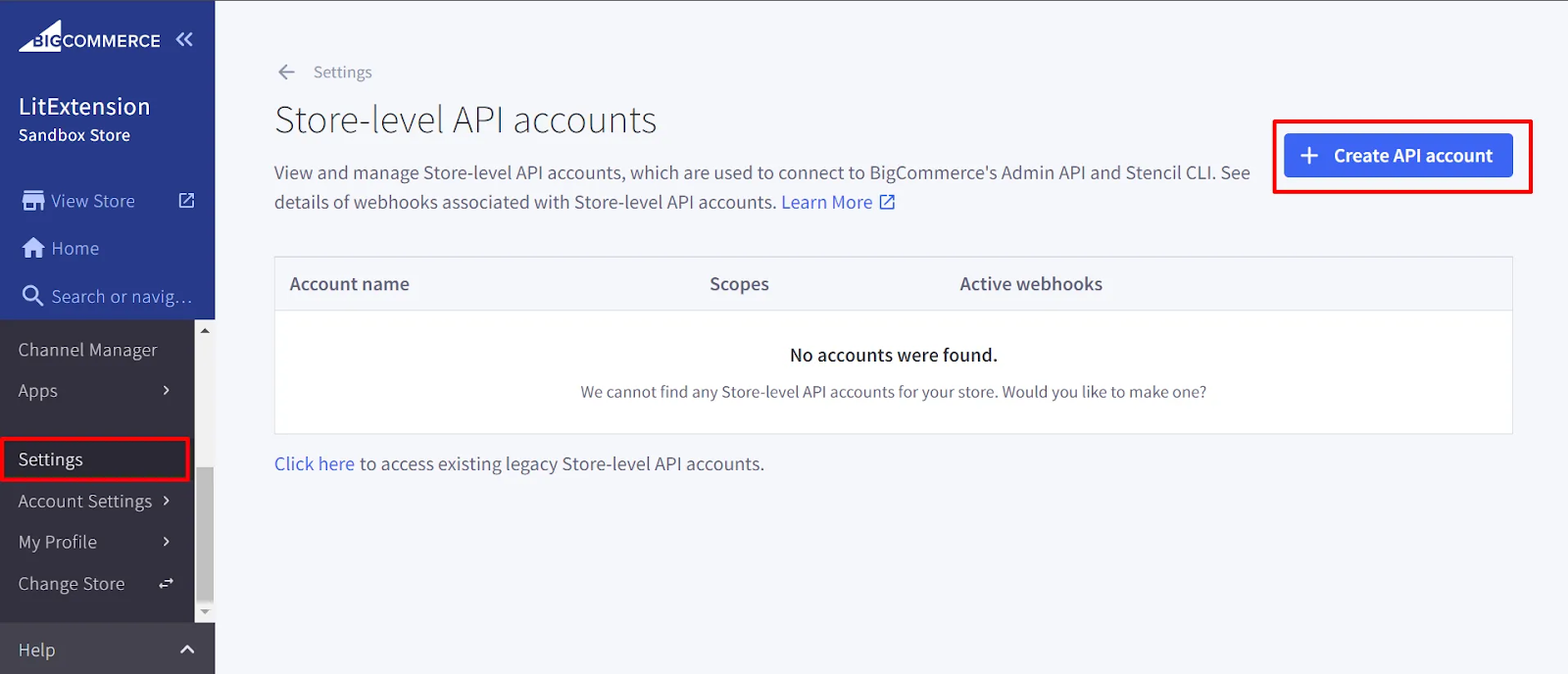
Step 1. Open the Store-Level API Accounts Menu
Go to Settings > Store-Level API Accounts from your BigCommerce admin panel. You’ll see the “+ Create API Account” button, which you need to click to begin.
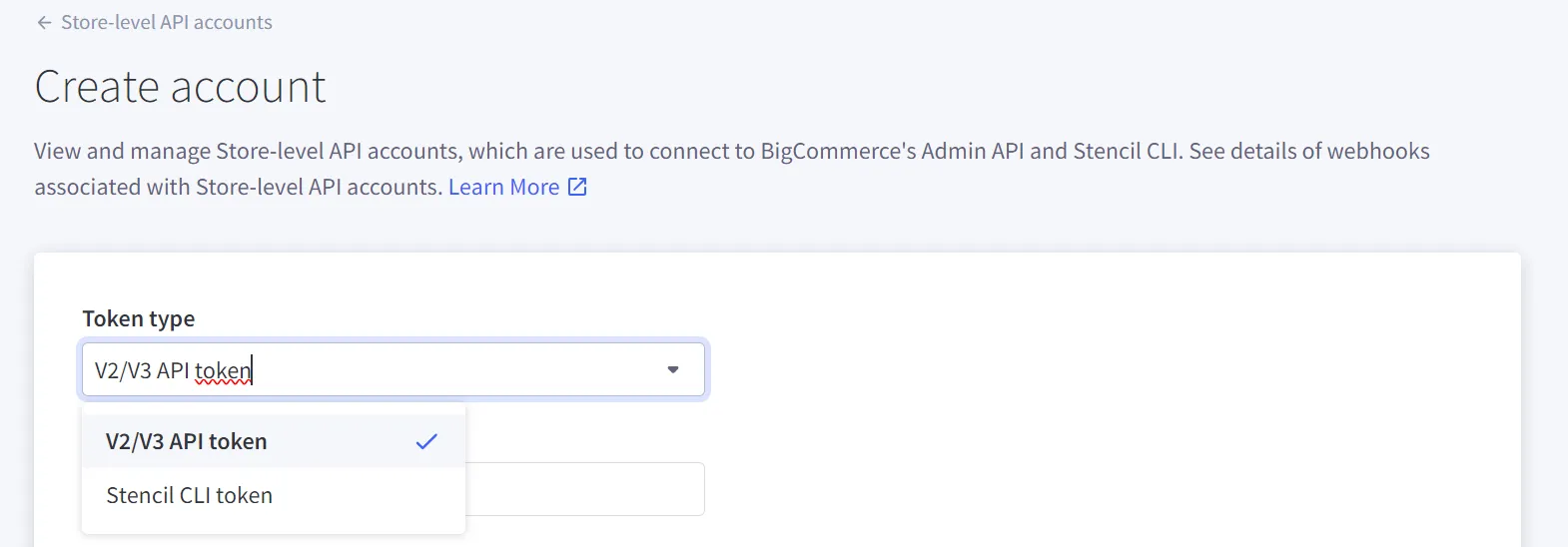
Step 2. Select a Token Type
From the dropdown, choose one of two token types. The V2/V3 API token is common, while the Stencil-CLI token is used for theme customization tools.
Step 3. Add an Account Name
Enter a name for the account in the input box. The name must have at least four characters.

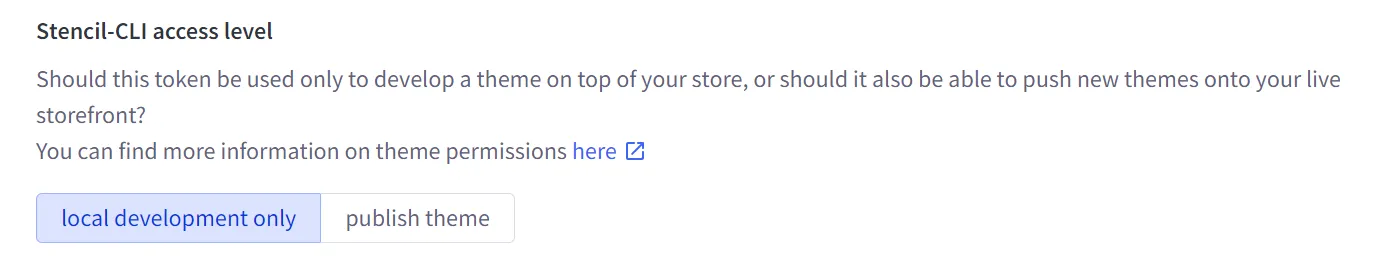
Step 4. Set the Access Level
If you selected a Stencil-CLI token, you’ll need to define its access level. Refer to the Dev Center’s guide on live theme previewing for more about Stencil-CLI tokens.
Step 5. Define API Resources
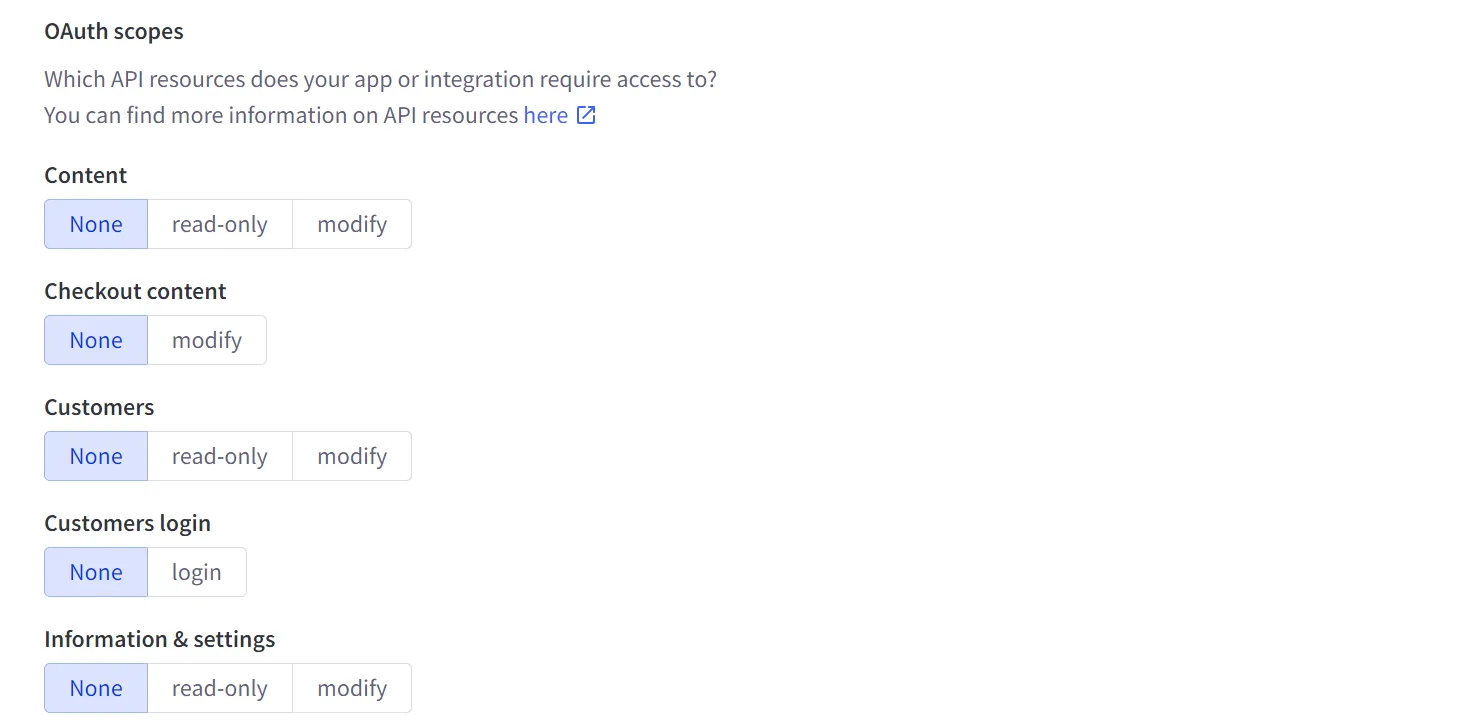
For V2/V3 tokens, note the API path, which is required to use the account. In the OAuth Scopes section, specify the resources and permissions your application or integration will need. BigCommerce offers a variety of OAuth Scopes so you can control access to store data. Details are available in the BigCommerce API Documentation.
Step 6. Save Your Settings
When everything is complete, click “Save.” A pop-up will appear showing the API credentials, and a .txt file with the same credentials will download automatically for safekeeping.
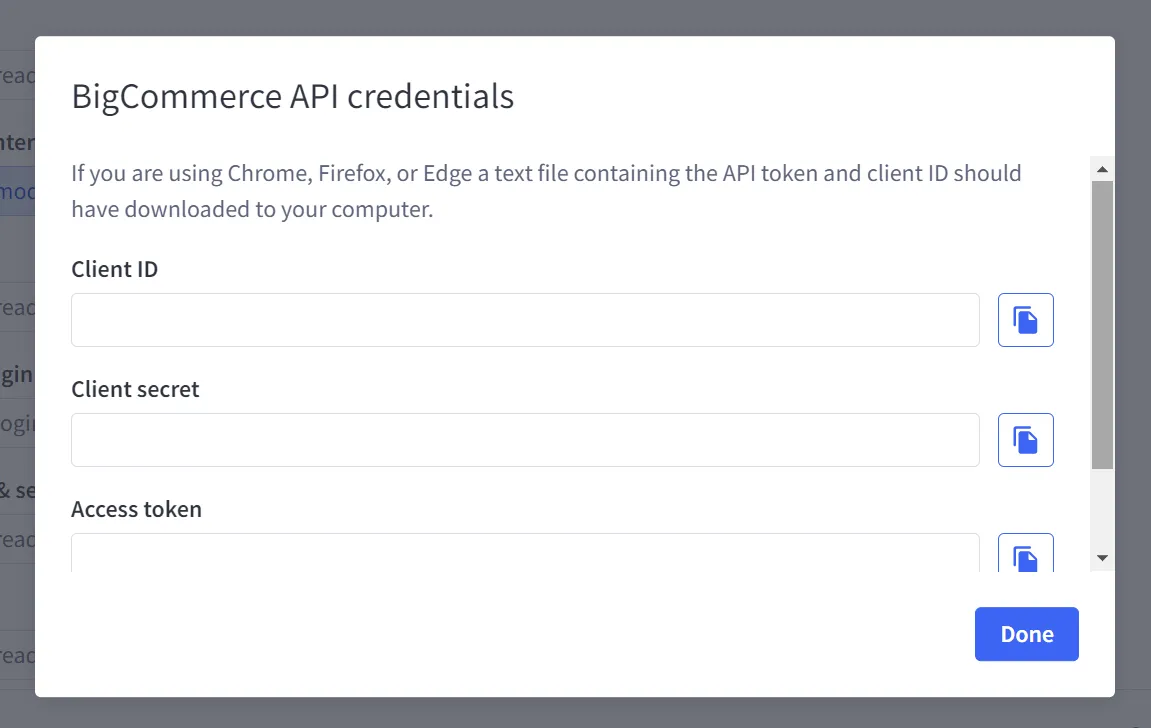
Be sure to store this file securely, since the pop-up won’t be shown again. For V2/V3 tokens, remember to add the API Path value from Step 5 to your saved credentials, as it is needed for making all API calls.
Account-Level API Setup
If you operate several stores at once, an account-level API account is the better choice over a store-level one. The setup process is straightforward.
Step 1. Go to the Account-Level API Tokens Page
From the Settings menu, select Account-Level API Tokens. Then click on the “+ Create Account-Level API Account” option to begin.

Step 2. Enter a Token Name
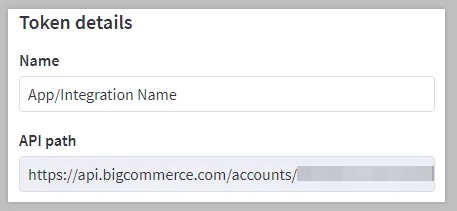
Provide a name for the application or integration linked to the API token. Be sure to copy or note the API path as you will need it later to work with this account.
Step 3. Define API Resources
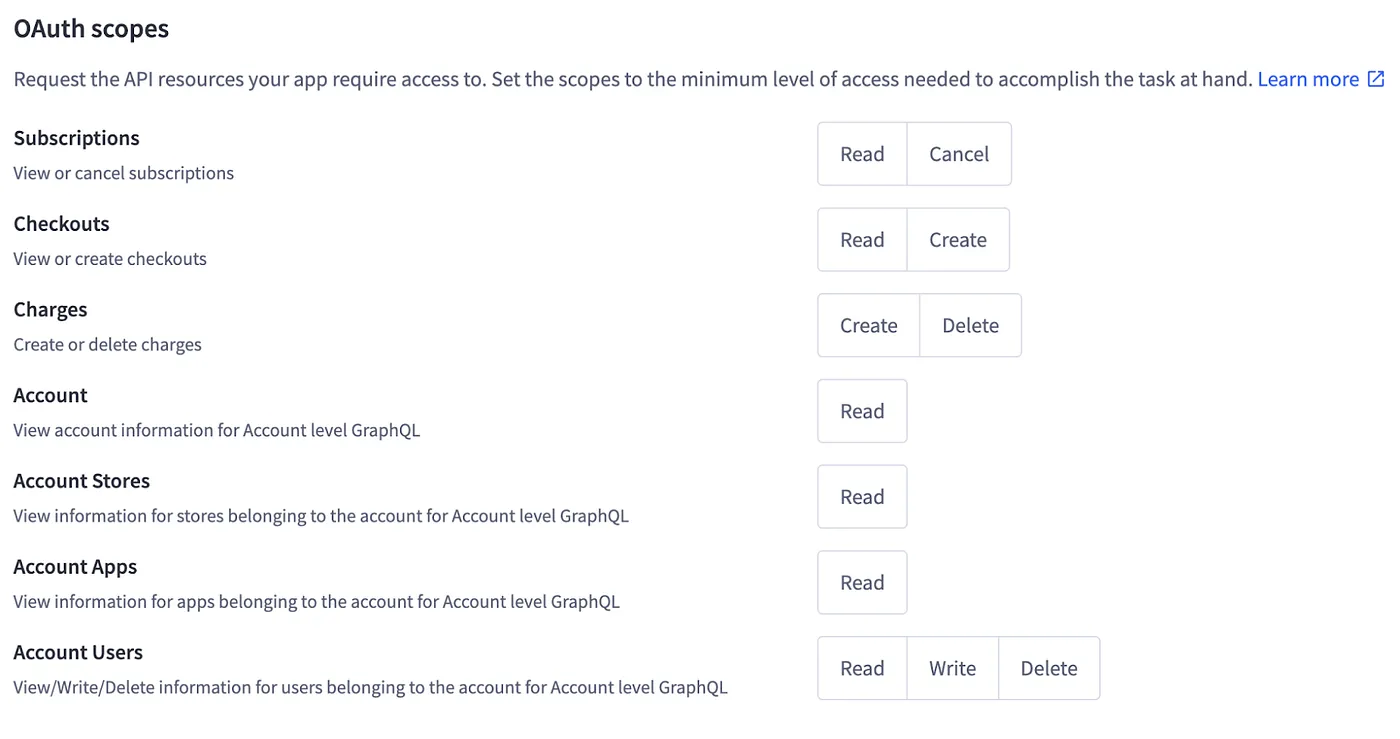
In the OAuth Scopes section, select the resources and permissions your app or integration requires. You can assign more than one permission to each resource if needed.
Step 4. Save Your Credentials
Once everything is configured, click “Save.” A pop-up will display your API credentials, and a .txt file with the same information will automatically download for safekeeping. Store this file securely so you have long-term access to your credentials.
Other Tasks You Can Do With Your BigCommerce API
In addition to creating BigCommerce API accounts, there are a few other related tasks you can carry out, including:
- Deleting an API account
- Viewing existing webhooks
- Enabling email notifications
We‘ll look at how each of these works in practice.
Deleting API Accounts
To remove a store-level BigCommerce API account, select Delete from the Action menu.
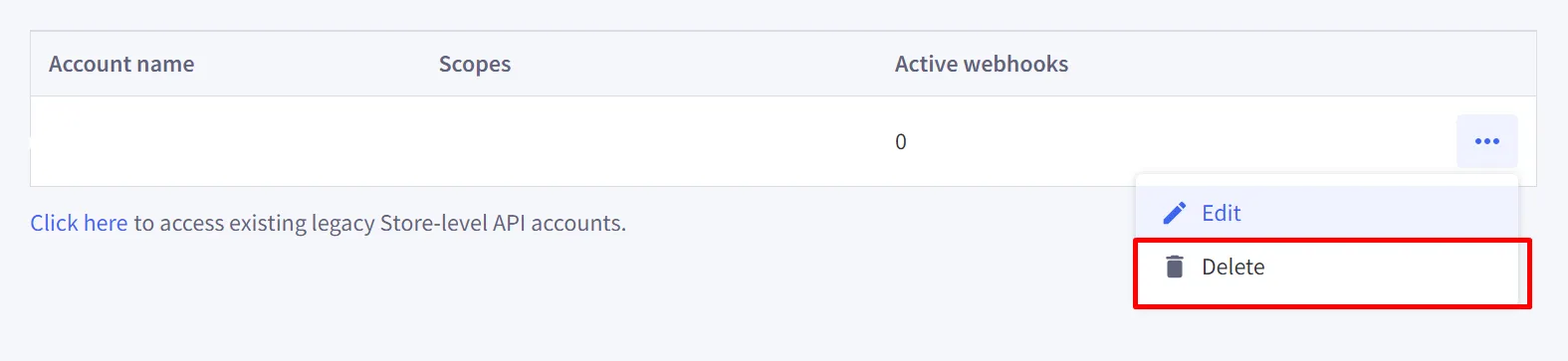
A confirmation window will appear before the account is permanently removed. If the account is tied to a webhook, you’ll need to enter the account name in a field before the button activates. Once confirmed, click Delete to finalize.
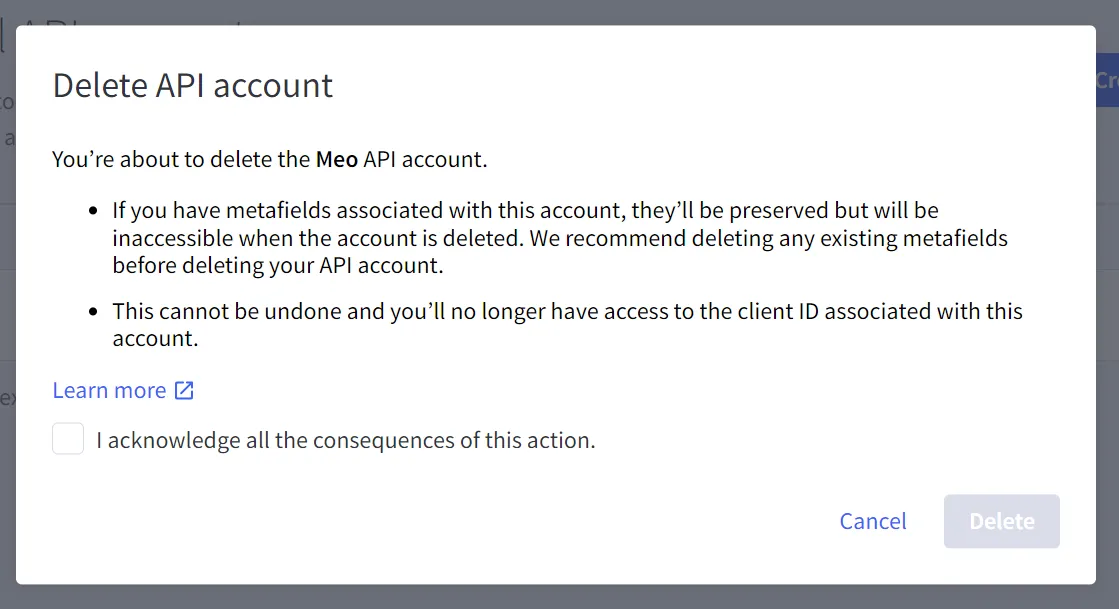
Keep these points in mind when deleting an account:
- Webhooks connected to the account will also be removed.
- Any metafields linked to the account remain but will no longer be accessible. It’s best to delete them first.
- This process cannot be undone, and the client ID for the account will be lost.
Viewing Existing Webhooks
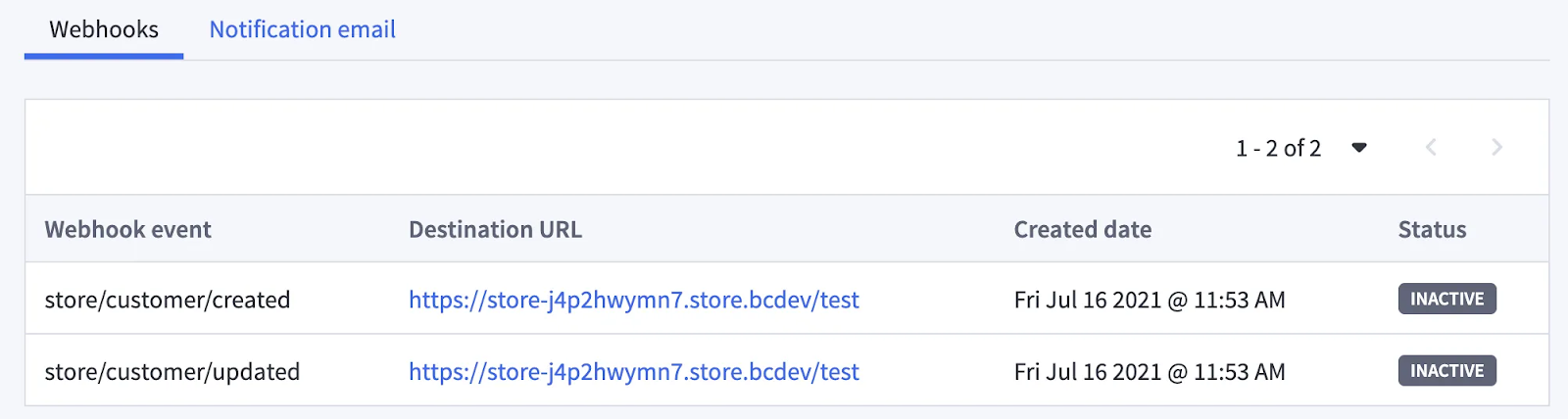
Webhooks notify applications about events on your BigCommerce store. Once you’ve set up a store-level account, you can review active or inactive webhooks, spot any that are blocklisted, and check associated domains.
To view them, choose Edit from the Action menu. You’ll see a list showing webhook events along with the destination URL, creation date, and current status.
Setting Up Email Notifications
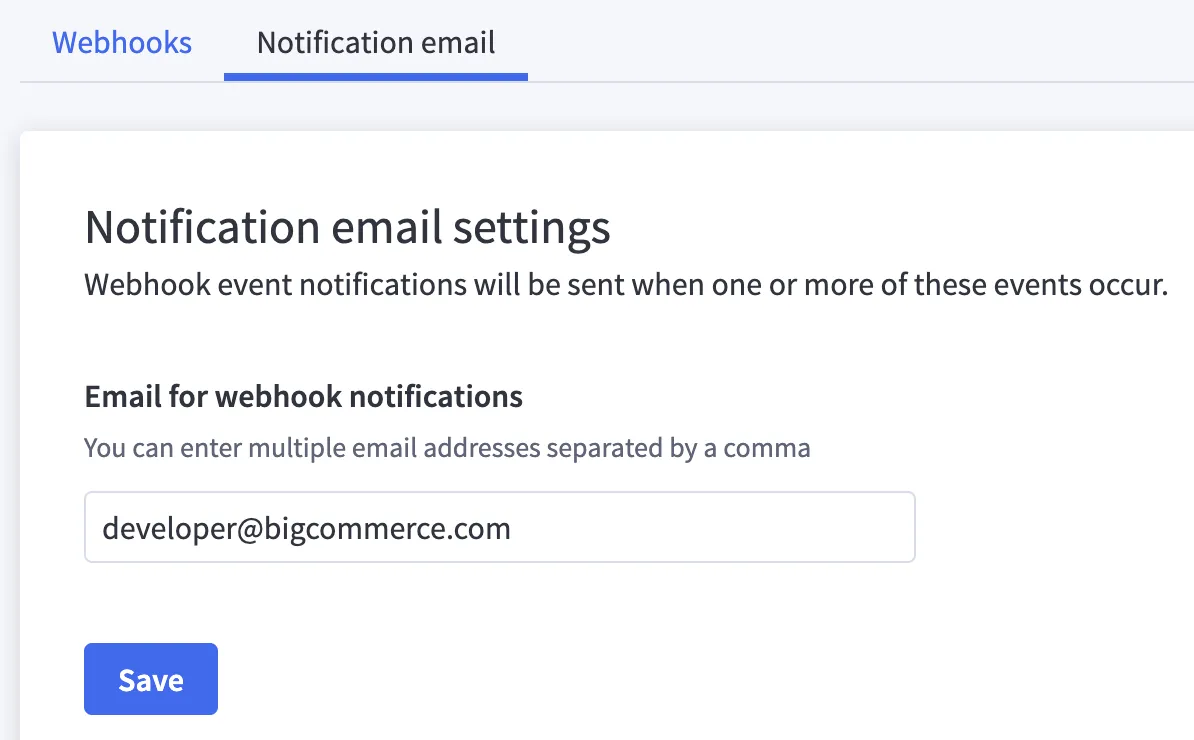
For better webhook management, you can enable email notifications to get alerts in real time. This way, you’ll be notified if a webhook is turned off or if a domain becomes blocklisted, allowing you to respond quickly.
Go to the Notification Email tab, then enter your address. You can add multiple emails, separated by commas. When finished, click Save to activate notifications.
FAQs: BigCommerce API
1. Is there an API in BigCommerce?
Yes. The BigCommerce API is a collection of tools and protocols that let developers programmatically access and interact with the platform. It enables you to manage store data, build custom integrations, and extend various functions within your eCommerce store.
2. What does the Storefront API do?
The Storefront API focuses on features tied to the front-end of your store. It gives developers access to product data, customer information, and storefront content, making it possible to build dynamic shopping experiences.
3. Are Webhooks supported in BigCommerce?
Yes. BigCommerce includes a webhook system that delivers real-time notifications for events like new orders, product updates, or customer changes. These webhooks send data to your chosen URLs so your applications can respond instantly.
4. What languages are used to build or access the BigCommerce API?
BigCommerce itself runs on a mix of technologies for both front-end and back-end. Developers can use languages like Ruby, PHP, Python, or Java to interact with the BigCommerce API and create custom apps or integrations. JavaScript and Stencil are also common for front-end customization.
5. Where do I get my BigCommerce API credentials?
To create your BigCommerce API credentials:
- Log into your BigCommerce control panel.
- From the left menu, go to Settings > Store-Level API Accounts.
- Click Create API Account.
- Choose V2/V3 API Token as the token type.
- Add a recognizable account name.
- In the OAuth Scopes section, select the permissions your application needs.
- Click Save. A pop-up will show your Client ID, Client Secret, and Access Token, and a .txt file will download. Remember to store these details securely, as you cannot view the Access Token again later.
Final Thoughts
The BigCommerce API is a powerful tool for building integrations, automating workflows, and customizing your store to match your business needs. From managing carts and orders to handling products, customers, and even webhooks, it gives you full control over the shopping experience. Whether you’re a developer building custom apps or a store owner looking for flexibility, these APIs open the door to greater efficiency and better customer engagement.
At GritGlobal, we build solutions powered by the platform’s API to help merchants run smarter and more efficient stores. Our BigCommerce Automation app, Atom8, makes it simple to create no-code workflows that save time and improve customer experiences. If you’re ready to take your store operations to the next level, contact us today.